Python Institute PCES Practice Test
Try 12 Python Institute Certified Entry-Level Security Specialist with Python (PCES) sample questions on secure input handling, secrets, files, APIs, logging, errors, and beginner Python security automation.
PCES is Certified Entry-Level Security Specialist with Python, a Python Institute route for candidates who want beginner Python security and automation practice rather than a broad vendor-neutral cybersecurity exam.
Use this page to confirm whether PCES fits your target, try 12 original Python security sample questions, and request IT Mastery updates if this is the next Python Institute bank you want prioritized.
Practice option: Sample questions available
PCES: Certified Entry-Level Security Specialist with Python practice update
Start with the 12 sample questions on this page. Dedicated practice for PCES: Certified Entry-Level Security Specialist with Python is not currently included as a full web-app practice page; enter your email to get updates when full practice becomes available or expands for this exam.
Need live practice now? See currently available IT Mastery exam pages.
What to do now
- Use Python Institute PCEP first if your Python syntax, functions, exceptions, strings, or file handling are still weak.
- Use Python Institute PCAP if you need stronger code-reading and object-oriented programming practice before security automation.
- Use CompTIA Security+ SY0-701 if you want broader security terminology before Python-specific secure coding.
- If PCES is your target, use the Notify me form on this page so the request is tied to the right Python Institute route.
PCES snapshot
| Item | Detail |
|---|---|
| Vendor | Python Institute / OpenEDG |
| Official certification name | Certified Entry-Level Security Specialist with Python |
| Exam code / family | PCES-30-01 / PCES-30-0x |
| Official exam status | Active, limited availability / small market trial |
| Published format | 45 questions, 60 minutes plus NDA, 75% passing score |
| Current IT Mastery status | Sample questions and Notify me updates |
| Best fit | beginner Python users who need security-aware scripts, input handling, secrets hygiene, and defensive automation |
Topic coverage for PCES practice
| Area | What to practise |
|---|---|
| Secure input handling | validation, allowlists, paths, types, ranges, and unsafe assumptions |
| Secrets and configuration | environment variables, credential exposure, API keys, and logging safety |
| Files and OS interaction | safe path handling, permissions, subprocess caution, and temporary files |
| Network and API basics | HTTP responses, authentication headers, TLS awareness, rate limits, and retries |
| Error handling and logging | useful diagnostics without leaking sensitive data |
| Security reasoning | least privilege, threat awareness, abuse cases, and review habits |
Python security triage diagram
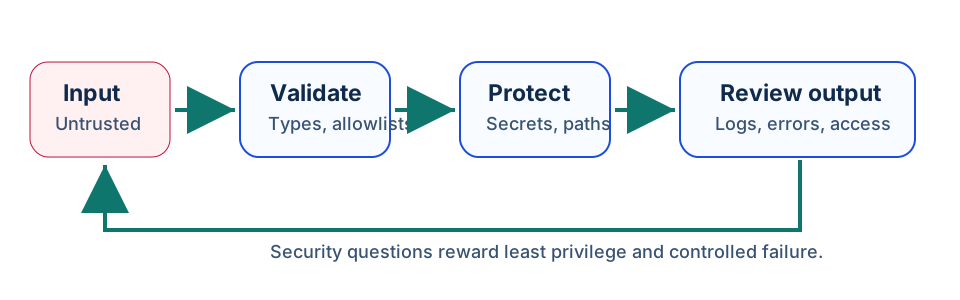
Use this diagram when a PCES question gives you a small script and asks what to fix first. Strong answers usually validate input, protect secrets, avoid unsafe file or shell behavior, and log enough for review without leaking private data.
    flowchart LR
	  Source["Untrusted source"] --> Validate["Validate and normalize"]
	  Validate --> Guard["Use safe APIs and least privilege"]
	  Guard --> Handle["Handle errors without leaking secrets"]
	  Handle --> Observe["Log decisions and review"]
Sample code checklist
| Pattern | Safer habit |
|---|---|
input() used directly in a file path | normalize and constrain the path before use |
| API key in source code | read from environment or a secrets manager |
except Exception: pass | log a safe error and preserve enough context to debug |
shell=True with user input | avoid shell invocation or use a fixed command with validated arguments |
| printing full tokens or headers | mask or omit sensitive values |
Sample Exam Questions
Try these 12 original sample questions for PCES. They are designed for self-assessment and are not official exam questions.
Question 1
Topic: input validation
A script accepts a filename from a web form and opens it directly:
name = request["file"]
with open(name, "r", encoding="utf-8") as f:
    data = f.read()
What is the main security concern?
- A. UTF-8 is always insecure.
- B. User-controlled paths can access unintended files unless constrained and validated.
- C.
read()cannot read text files. - D. Files should always be opened in binary mode.
Best answer: B
Explanation: The user controls the path. A safer design constrains the file to an allowed directory, rejects traversal patterns, validates names, and avoids opening arbitrary paths. Encoding choice is not the main issue.
Question 2
Topic: secrets handling
Which pattern is safest for a small Python script that needs an API token?
- A. Commit the token in the source file so the script is portable.
- B. Print the token at startup to verify it is correct.
- C. Put the token in a public README for easier onboarding.
- D. Read the token from an approved environment or secrets source and avoid logging it.
Best answer: D
Explanation: Secrets should not be committed or printed. Reading from an approved external source reduces accidental exposure, and logs should mask or omit sensitive values.
Question 3
Topic: password storage
A user-registration script currently stores passwords as plain text. What is the best correction?
- A. Hash passwords with a password-specific algorithm and per-user salt.
- B. Reverse each password string before saving it.
- C. Store passwords in a hidden column named
secret. - D. Encode passwords with Base64.
Best answer: A
Explanation: Passwords should be stored using a password-hashing approach designed for password storage, with salts and appropriate work factors. Reversal, hidden columns, and Base64 are not protective password storage.
Question 4
Topic: exception handling
What is the weakness in this code?
try:
    send_report()
except Exception:
    pass
- A. It catches only syntax errors.
- B. It forces
send_report()to run twice. - C. It suppresses failures without recording what happened.
- D. It automatically encrypts the report.
Best answer: C
Explanation: Silent failure hides security and reliability problems. A safer handler records a useful, non-sensitive error and chooses a controlled recovery or escalation path.
Question 5
Topic: least privilege
A Python automation account only needs to read object metadata from storage. Which permission model is best?
- A. Full administrator access.
- B. Write and delete permissions for all buckets.
- C. Read-only metadata permission scoped to the required resource.
- D. Shared root credentials.
Best answer: C
Explanation: Least privilege grants only what the script needs. Broad administrator or delete access increases blast radius if the script or credential is misused.
Question 6
Topic: subprocess safety
Why is this pattern risky?
import subprocess

subprocess.run(f"grep {term} data.txt", shell=True)
- A. It prevents the command from running.
- B. It can combine shell execution with untrusted input.
- C. It encrypts
termautomatically. - D. It only works on empty files.
Best answer: B
Explanation: If term is user-controlled, shell interpretation can create command-injection risk. Prefer fixed commands, argument lists, validation, and avoiding shell=True when possible.
Question 7
Topic: logging
Which log line is safest when an API request fails?
- A.
Customer SSN and password were rejected - B.
Token sk_live_123... failed - C.
Authorization: Bearer full-token-here - D.
Payment API failed for request_id=abc123 with status=403
Best answer: D
Explanation: Useful logs identify the request and status without exposing tokens, passwords, or highly sensitive personal data. Logs are often widely accessible and retained longer than expected.
Question 8
Topic: dependency risk
A project uses an outdated third-party package with a published security vulnerability. What should the developer do first?
- A. Ignore it because Python packages cannot be vulnerable.
- B. Review impact, upgrade or patch through a controlled change, and test affected code.
- C. Rename the package locally.
- D. Delete the lock file and deploy immediately.
Best answer: B
Explanation: Vulnerability handling should be controlled: confirm exposure, update or mitigate, test, and deploy safely. Renaming a package or ignoring the issue does not reduce risk.
Question 9
Topic: data minimization
A script exports support tickets for debugging. Which field should usually be removed first if it is not needed for the bug?
- A. Ticket status.
- B. Error category.
- C. Customer payment-card number.
- D. Timestamp rounded to the minute.
Best answer: C
Explanation: Sensitive data that is not needed should be removed or masked. Data minimization reduces harm if the export is shared, logged, or retained.
Question 10
Topic: secure defaults
A local development tool starts an HTTP server. Which default is safest?
- A. Bind to
127.0.0.1unless external access is explicitly needed. - B. Bind to all interfaces and disable authentication.
- C. Print secrets on the home page.
- D. Accept uploads from any network without limits.
Best answer: A
Explanation: Local-only binding reduces accidental exposure. External binding should be deliberate and paired with authentication, authorization, and network controls.
Question 11
Topic: token comparison
Why can a constant-time comparison function matter for secret tokens?
- A. It prevents every network attack.
- B. It makes tokens shorter.
- C. It removes the need for HTTPS.
- D. It reduces information leakage from timing differences.
Best answer: D
Explanation: If comparison timing varies by how many characters match, attackers may infer information. Constant-time comparison reduces that specific side channel.
Question 12
Topic: safe parsing
A script receives JSON from an external API. What should it do before using fields to make decisions?
- A. Validate required keys, types, ranges, and allowed values.
- B. Assume every field is present and valid.
- C. Convert the whole response to a string and trust it.
- D. Disable error handling.
Best answer: A
Explanation: External data should be treated as untrusted. Validation confirms that required fields exist and have expected types and values before the script acts on them.
Quick Cheat Sheet
| Concept | PCES reminder |
|---|---|
| Validate input | check type, range, format, and allowed values before use |
| Protect secrets | keep tokens out of code, logs, screenshots, and public files |
| Least privilege | grant only the permission a script needs |
| Safe errors | reveal enough to debug, not enough to leak sensitive details |
| Dependency hygiene | update vulnerable packages through a tested change |
Mini Glossary
- Allowlist: a list of accepted values, patterns, or actions.
- Command injection: unsafe command execution caused by mixing shell behavior with untrusted input.
- Secret: a credential, token, key, or password that must not be exposed.
- Least privilege: granting the smallest useful set of permissions.
- Data minimization: using or sharing only the data needed for the task.