Python Institute PCEA Practice Test
Try 12 Python Institute Certified Entry-Level Automation Specialist with Python (PCEA) sample questions on scripts, files, schedules, APIs, retries, logging, idempotency, and safe automation.
PCEA is Certified Entry-Level Automation Specialist with Python, a Python Institute route for candidates who want beginner automation, scripting, and operational task practice with Python.
Use this page to confirm whether PCEA fits your target, try 12 original Python automation sample questions, and request IT Mastery updates if automation-with-Python is the route you want prioritized.
Practice option: Sample questions available
PCEA: Certified Entry-Level Automation Specialist with Python practice update
Start with the 12 sample questions on this page. Dedicated practice for PCEA: Certified Entry-Level Automation Specialist with Python is not currently included as a full web-app practice page; enter your email to get updates when full practice becomes available or expands for this exam.
Need live practice now? See currently available IT Mastery exam pages.
What to do now
- Use Python Institute PCEP first if you need Python fundamentals before automating files, APIs, or scheduled tasks.
- Use Python Institute PCAP if you need stronger functions, exceptions, modules, and object-oriented code-reading practice.
- Use PCES if your automation work is security-sensitive and you need input, secrets, and logging practice.
- If PCEA is your target, use the Notify me form on this page so the request is tied to the right Python Institute route.
PCEA snapshot
| Item | Detail |
|---|---|
| Vendor | Python Institute / OpenEDG |
| Official certification name | Certified Entry-Level Automation Specialist with Python |
| Exam code / family | PCEA-30-01 / PCEA-30-0x |
| Official exam status | Active, limited availability / small market trial |
| Published format | 45 questions, 60 minutes plus NDA, 75% passing score |
| Current IT Mastery status | Sample questions and Notify me updates |
| Best fit | beginner Python users who need safe scripts, repeatable workflows, basic APIs, files, schedules, and automation troubleshooting |
Topic coverage for PCEA practice
| Area | What to practise |
|---|---|
| Script structure | arguments, functions, modules, configuration, and clear control flow |
| Files and directories | reading, writing, paths, encodings, backups, and temporary files |
| Scheduling and events | cron-like timing, triggers, retries, and idempotent repeated runs |
| APIs and web requests | HTTP status checks, JSON parsing, authentication headers, timeouts, and rate limits |
| Error handling and logging | visible failures, safe retries, useful logs, and alerts |
| Automation safety | dry runs, permissions, confirmation, rollback, and avoiding destructive assumptions |
Python automation control diagram
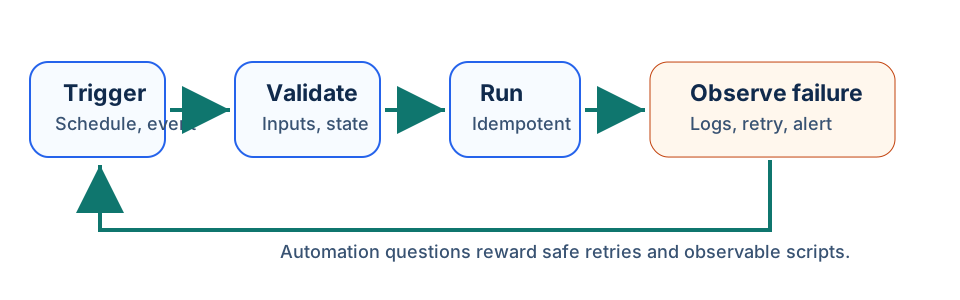
Use this diagram when a PCEA question asks what makes an automation script reliable. Strong answers validate state before action, keep the task repeatable, record outcomes, and handle failure without causing duplicate work.
    flowchart LR
	  Trigger["Schedule or event"] --> Check["Check inputs and current state"]
	  Check --> Action["Run the smallest safe action"]
	  Action --> Record["Log result"]
	  Record --> Retry["Retry, alert, or stop safely"]
Sample code checklist
| Pattern | Safer automation habit |
|---|---|
| script deletes files immediately | add dry-run mode, confirmations, filters, and backups |
| API call has no timeout | set a timeout and handle retryable failures |
| scheduled job assumes prior run succeeded | check current state before acting |
log says only failed | include safe context such as job name, request ID, and error class |
| script repeats the same side effect | design for idempotency where possible |
Sample Exam Questions
Try these 12 original sample questions for PCEA. They are designed for self-assessment and are not official exam questions.
Question 1
Topic: idempotency
A scheduled script may run twice if a job scheduler retries after a timeout. Which design reduces duplicate side effects?
- A. Print less output.
- B. Check current state before changing it and make repeated runs safe.
- C. Delete the log file at startup.
- D. Use a longer variable name.
Best answer: B
Explanation: Idempotent automation can run more than once without causing duplicate work. Checking current state before acting is more important than cosmetic changes.
Question 2
Topic: file backup
A script will rename hundreds of files. What is the best safety feature before the first real run?
- A. Disable all output.
- B. Run only on Fridays.
- C. Convert every filename to uppercase without review.
- D. Add a dry-run mode that prints intended changes without modifying files.
Best answer: D
Explanation: Dry-run mode lets the operator inspect planned changes before the script changes real files. This is especially useful for bulk operations.
Question 3
Topic: API status handling
What should this script check before trusting the response body?
response = requests.get(url, timeout=10)
data = response.json()
- A. HTTP status and whether the response is valid JSON for the expected schema.
- B. Whether the variable name is exactly four letters.
- C. Whether the URL contains a vowel.
- D. Whether the computer fan is running.
Best answer: A
Explanation: Automation should check status codes, parse errors, and expected fields before acting. A failed or unexpected response can otherwise drive incorrect actions.
Question 4
Topic: command-line arguments
A script accepts a --delete flag. Which design is safest?
- A. Treat every run as delete mode.
- B. Hide the flag from help output.
- C. Require an explicit flag and show a clear summary of what will be deleted.
- D. Delete first and ask questions later.
Best answer: C
Explanation: Destructive actions should be explicit and visible. Help text, confirmation, dry runs, and summaries reduce accidental damage.
Question 5
Topic: scheduling
A script runs every hour and processes new files in an incoming folder. What should it do with processed files?
- A. Leave them in place with no marker.
- B. Process the oldest file forever.
- C. Move, mark, or record processed files so they are not processed repeatedly.
- D. Randomly delete half the folder.
Best answer: C
Explanation: Scheduled automation needs state tracking. Moving, marking, or recording processed files prevents repeat processing and supports recovery.
Question 6
Topic: logging
Which log entry is most useful for a failed automation job?
- A.
job=invoice-sync request_id=823 status=failed error=TimeoutError - B.
bad - C.
nope - D.
the script is sad
Best answer: A
Explanation: A useful automation log includes job identity, correlation or request ID when available, outcome, and a safe error class. It should avoid leaking secrets.
Question 7
Topic: exception handling
What is the main problem with this automation handler?
try:
    sync_records()
except Exception:
    sync_records()
- A. It always imports NumPy.
- B. It cannot call a function.
- C. It logs too much.
- D. It retries without checking whether the first attempt partially succeeded.
Best answer: D
Explanation: Blind retries can duplicate side effects if the first attempt partly completed. Safer retries check state, use idempotency keys where available, and log the failure.
Question 8
Topic: JSON parsing
A workflow reads this JSON:
{"enabled": true, "max_items": 50}
What should the script validate before using it?
- A. That JSON keys are sorted alphabetically.
- B. That the file is exactly one line.
- C. That
enabledis a Boolean andmax_itemsis an expected numeric range. - D. That the JSON was opened in a text editor.
Best answer: C
Explanation: Automation configuration should be validated for expected keys, types, and ranges before it controls behavior.
Question 9
Topic: path handling
Which Python library is commonly used for clearer cross-platform path handling?
- A.
pathlib - B.
random - C.
cmath - D.
webbrowseronly
Best answer: A
Explanation: pathlib provides object-oriented path operations and can make file automation clearer and more portable than manual string concatenation.
Question 10
Topic: rate limits
An API returns HTTP 429 during a bulk sync. What should the automation do?
- A. Retry faster in a tight loop.
- B. Respect rate-limit guidance, back off, and retry safely when appropriate.
- C. Ignore the status and parse the response as success.
- D. Delete local data immediately.
Best answer: B
Explanation: HTTP 429 indicates too many requests. Controlled backoff and retry logic protects the API and reduces failures.
Question 11
Topic: environment configuration
Why is this pattern useful?
import os

mode = os.getenv("APP_MODE", "dry-run")
- A. It forces production mode every time.
- B. It disables all testing.
- C. It removes the need for logging.
- D. It defaults to a safer mode unless configuration explicitly changes it.
Best answer: D
Explanation: Defaulting to dry-run is safer than defaulting to a destructive mode. Environment variables can configure behavior without changing code.
Question 12
Topic: alerts
A nightly automation job fails after business hours. What is the best operational design?
- A. Fail silently until someone notices missing results.
- B. Send a controlled alert with job name, safe error context, and next step.
- C. Print the full password in the alert.
- D. Delete the schedule.
Best answer: B
Explanation: Automation should make failures visible. Alerts need enough context for triage, but they should not expose credentials or sensitive data.
Quick Cheat Sheet
| Concept | PCEA reminder |
|---|---|
| Dry run | preview changes before modifying real systems |
| Idempotency | repeated runs should not create duplicate side effects |
| Timeout | network automation should not wait forever |
| Backoff | retry slower after rate limits or transient failures |
| Safe defaults | non-destructive behavior should be the default |
Mini Glossary
- Dry run: execution mode that shows intended actions without making changes.
- Idempotency: property that repeated execution has the same effect as one execution.
- Backoff: waiting longer between retries after failures or rate limits.
- Scheduler: service or tool that runs jobs at defined times.
- Correlation ID: value used to connect logs across one automation run.